
Cloud Native를 하다보면 여러 오픈소스들을 다루게 된다고 하지만,
내부 고객, 외부 고객사, 운영업체 등 요구하는게 너무 다양하다.
이번에는 LGTM을 해야한다…Loki, Grafana, Tempo, Mimir.
LGTM ( Loki Grafana Tempo Mimir )

# 기본 흐름
 ┌────────────┐     ┌────────────┐     ┌────────────┐
 │  Promtail  │────▶│    Loki    │────▶│  Grafana   │
 └────────────┘     └────────────┘     └────────────┘
 ┌────────────┐     ┌────────────┐     ┌────────────┐
 │ Prometheus │────▶│   Mimir    │────▶│  Grafana   │
 └────────────┘     └────────────┘     └────────────┘
 ┌───────────────┐     ┌────────────┐     ┌────────────┐
 │ OpenTelemetry │────▶│   Tempo    │────▶│  Grafana   │
 └───────────────┘     └────────────┘     └────────────┘
gpt를 통해 간단하게 리서치해본 결과.
LGTM 스택 구성요소와 대응 비교
| 구성요소 | 역할 | 유사한 도구 (EFK/Prometheus 계열) | 비교 설명 |
|---|---|---|---|
| Loki | 로그 수집 및 저장 | Elasticsearch + Fluentd/Fluent Bit | Loki는 로그를 “인덱스 없이” 저장해 비용과 성능을 개선. Fluent Bit이나 Promtail을 통해 수집. 쿼리는 Grafana에서 LogQL로 수행. |
| Grafana | 시각화 및 대시보드 | Kibana / Grafana | Kibana와 달리 Loki, Tempo, Mimir 모두를 통합 관리 가능. EFK에서 Kibana는 Elasticsearch만 시각화 가능. |
| Tempo | 트레이싱(Distributed Tracing) | Jaeger / Zipkin | Jaeger와 유사하지만, 저장을 위한 백엔드(예: S3, GCS, MinIO 등)를 직접 사용해 더 단순하고 통합성이 좋음. |
| Mimir | 메트릭 저장 및 분석 | Prometheus / Thanos / Cortex | Mimir은 Prometheus를 수평 확장(HA) 가능한 버전으로 발전시킨 것. Cortex 기반이며 장기 스토리지 및 멀티테넌시 지원. |
기능 비교 요약
| 기능 영역 | LGTM 스택 (Loki, Grafana, Tempo, Mimir) | EFK + Prometheus 스택 |
|---|---|---|
| 로그 수집 | Loki + Promtail | Fluent Bit / Fluentd + Elasticsearch |
| 로그 저장 구조 | 인덱스 최소화 (메타데이터 기반) | 인덱스 기반 (Elasticsearch) |
| 메트릭 | Mimir (Prometheus 확장형) | Prometheus |
| 트레이스(분산 추적) | Tempo | Jaeger / Zipkin |
| 시각화 | Grafana (중앙 통합) | Kibana (로그), Grafana (메트릭) |
| 확장성 | Mimir, Tempo 모두 수평 확장 및 오브젝트 스토리지 사용 | Prometheus/Elasticsearch 확장은 상대적으로 복잡 |
| 운영 비용 | 상대적으로 낮음 (인덱스 없음, 오브젝트 스토리지 기반) | 높은 편 (Elasticsearch의 인덱싱, 클러스터 관리 필요) |
| 통합성 | Grafana 하나로 모든 데이터(Log, Metric, Trace) 조회 가능 | Kibana + Grafana + Jaeger 등 분리 |
아키텍처 관정에서의 차이
| 비교 항목 | LGTM | EFK + Prometheus |
|---|---|---|
| 스토리지 구조 | 오브젝트 스토리지(S3, MinIO 등)에 직접 저장 | 로컬 디스크 또는 전용 DB (Elasticsearch, TSDB 등) |
| 쿼리 언어 | LogQL / PromQL / TraceQL (Grafana 통합) | Lucene / PromQL / Jaeger UI |
| 운영 편의성 | Grafana Agent로 통합 수집 가능 | 각각의 Agent (Fluentd, Node Exporter 등) 필요 |
| 유지보수 복잡도 | 낮음 (Grafana Labs 통합 솔루션) | 높음 (각 구성요소 개별 관리 필요) |
| 라이선스 및 상호 호환성 | Grafana OSS 기반 (AGPLv3) | Elastic은 SSPL 이후 제한, Prometheus는 Apache 2.0 |
정리
| 목적 | LGTM 권장 | EFK+Prometheus 권장 |
|---|---|---|
| 클라우드 네이티브 환경 (K8s 등) | ✅ | ⚪ |
| 운영 단순화 / 통합 관찰성 | ✅ | ⚪ |
| 기존 Elastic Stack 인프라 보유 | ⚪ | ✅ |
| 대규모 로그 인덱싱 / 검색 중심 | ⚪ | ✅ |
| 저비용, 오브젝트 스토리지 기반 로그 | ✅ | ⚪ |
좀더 찾아보면 어느게 더 알맞는지 알수있겠지만 우선 동작부터 시켜보고 비교해봐야할듯..
1. logging ( Promtail, Loki, Grafana)
loki는 Log저장소로 사용되는 것으로 OpenSearch와 대비해서 생각해야할것 같다.
그렇다면 로그를 수집하는 것은 어떤 것이하는지 알아야하는데, fluentbit도 가능하고 grafana에서 공식지원하는 promtail도 가능하다.
promtail을 사용해보겠다.
 ┌────────────┐           ┌────────────┐     ┌────────────┐
 │  Promtail  │── Logs ──▶│    Loki    │────▶│  Grafana   │
 └────────────┘           └────────────┘     └────────────┘
Promtail
https://grafana.com/docs/loki/latest/send-data/promtail
promtail로 해보려고했는데 Alloy라는것으로 변경되나보다…
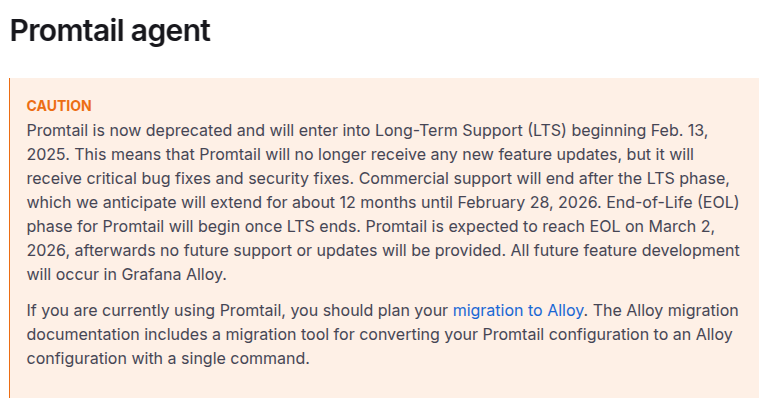
간단하게 시작해보는 용도로 promtail로 구성해보고 Alloy는 일단 리서치만..
kubernetes에 promtail을 배포해본다.
Promtail을 배포하기위해서 Loki Endpoint가 필요로 한다. Loki를 선행 배포해야 할것으로 보여진다.
https://grafana.com/docs/loki/latest/send-data/promtail/installation
배포권장방법이라 표기된 Install as Kubernetes daemonSet(recommended)를 참고하여 구성한다.
--- # Daemonset.yaml
apiVersion: apps/v1
kind: DaemonSet
metadata:
  name: promtail-daemonset
spec:
  selector:
    matchLabels:
      name: promtail
  template:
    metadata:
      labels:
        name: promtail
    spec:
      serviceAccount: promtail-serviceaccount
      containers:
      - name: promtail-container
        image: grafana/promtail:3.5.8
        args:
        - -config.file=/etc/promtail/promtail.yaml
        env:
        - name: 'HOSTNAME' # needed when using kubernetes_sd_configs
        # "Kubernetes Service Discovery Configs"
        # "쿠버네티스 서비스 디스커버리 설정"의 줄임말입니다.
          valueFrom:
            fieldRef:
              fieldPath: 'spec.nodeName' # Pod가 스케줄된 실제 노드 이름을 Kubernetes API에서 가져옴
        volumeMounts:
        - name: logs
          mountPath: /var/log
        - name: promtail-config
          mountPath: /etc/promtail
        - mountPath: /var/lib/docker/containers
          name: varlibdockercontainers
          readOnly: true
      volumes:
      - name: logs
        hostPath:
          path: /var/log
      - name: varlibdockercontainers
        hostPath:
          path: /var/lib/docker/containers
      - name: promtail-config
        configMap:
          name: promtail-config
--- # configmap.yaml
apiVersion: v1
kind: ConfigMap
metadata:
  name: promtail-config
data:
  promtail.yaml: |
    server:
      http_listen_port: 9080
      grpc_listen_port: 0

    clients:
    #- url: https://{YOUR_LOKI_ENDPOINT}/loki/api/v1/push
    - url: http://loki-gateway.monitoring.svc.cluster.local/loki/api/v1/push
    # auth_enabled=true 일때 아래 설정
      headers:
        X-Scope-OrgID: tk8s
    positions:
      filename: /tmp/positions.yaml
    target_config:
      sync_period: 10s
    scrape_configs:
    - job_name: pod-logs
      kubernetes_sd_configs:
        - role: pod
      pipeline_stages:
        - docker: {}
      relabel_configs:
        - source_labels:
            - __meta_kubernetes_pod_node_name
          target_label: __host__
        - action: labelmap
          regex: __meta_kubernetes_pod_label_(.+)
        - action: replace
          replacement: $1
          separator: /
          source_labels:
            - __meta_kubernetes_namespace
            - __meta_kubernetes_pod_name
          target_label: job
        - action: replace
          source_labels:
            - __meta_kubernetes_namespace
          target_label: namespace
        - action: replace
          source_labels:
            - __meta_kubernetes_pod_name
          target_label: pod
        - action: replace
          source_labels:
            - __meta_kubernetes_pod_container_name
          target_label: container
        - replacement: /var/log/pods/*$1/*.log
          separator: /
          source_labels:
            - __meta_kubernetes_pod_uid
            - __meta_kubernetes_pod_container_name
          target_label: __path__

--- # Clusterrole.yaml
apiVersion: rbac.authorization.k8s.io/v1
kind: ClusterRole
metadata:
  name: promtail-clusterrole
rules:
  - apiGroups: [""]
    resources:
    - nodes
    - services
    - pods
    verbs:
    - get
    - watch
    - list

--- # ServiceAccount.yaml
apiVersion: v1
kind: ServiceAccount
metadata:
  name: promtail-serviceaccount

--- # Rolebinding.yaml
apiVersion: rbac.authorization.k8s.io/v1
kind: ClusterRoleBinding
metadata:
  name: promtail-clusterrolebinding
subjects:
    - kind: ServiceAccount
      name: promtail-serviceaccount
      namespace: default
roleRef:
    kind: ClusterRole
    name: promtail-clusterrole
    apiGroup: rbac.authorization.k8s.io
Alloy
https://grafana.com/docs/alloy/latest
| 구분 | Promtail | Grafana Alloy |
|---|---|---|
| 역할 | 로그 수집 전용 | 로그 + 메트릭 + 트레이스 통합 |
| 기반 기술 | Loki 고유 포맷 | OpenTelemetry Collector |
| 개발 상태 | 유지보수만, 기능 추가 중단 | Grafana Labs의 향후 표준 |
| 구성 난이도 | 간단 (Prometheus 유사) | 복잡하지만 유연함 |
| 리소스 사용량 | 낮음 | 다소 높음 (CPU/RAM 증가) |
| 마이그레이션 도구 | Alloy로 전환 도구 제공 | Promtail 설정 자동 변환 지원 |
| 적합한 환경 | 단순 로그 수집 환경 | 통합 관측 플랫폼 구축 환경 |
Loki
loki를 배포하려면 어떤 타입으로 배포할지 고민해봐야 한다.
이 부분은 운영환경에 따라 그리고 누가 운영하느냐에 따라 달라지는게 맞다.
https://grafana.com/docs/loki/latest/get-started/deployment-modes/?utm_source=chatgpt.com

공식문서에서도 ‘Simple Scalable’ 모드로 구성해도 하루 최대 몇 TB로그까지 확장된다고 적혀있는데, ‘microservice’로 기본배포되는 LGTM 스택으로 배포해달라고하는 고객을 만나면 글쎄…어떤 mode로 구성해야되는지 물어보는 순간 헬게이트가 열릴수도…

| 모드 | 구성 특징 | Helm 차트 | 권장 용도 |
|---|---|---|---|
| Single Binary (Monolithic) | 모든 컴포넌트(ingester, querier, compactor 등)가 하나의 바이너리에서 동작 | grafana/loki | 개발/테스트 |
| Simple Scalable | Read / Write / Backend 3계층 분리, 간단한 수평 확장 가능 | grafana/loki (기본값) | 중형 규모 프로덕션 |
| Distributed (Microservices) | 각 구성요소를 완전 분리 (Distributor, Ingester, Querier 등) | grafana/loki-distributed | 대규모, 고가용성 운영 |

일단은 이런 구조로 구성해야할듯…보통은 다중 클러스터에 중앙 집중 구조를 원하는 형상이 많으므로…
Loki는 배포방식이좀 다르니 배포 구성은 달라질수 있다.
MinIO가 포함되어있는데 ObjectStorage운영도 하나 추가된다고 생각해야한다.
public SaaS를 이용하면 그 사용 방법을 적용하는 구성 필요.
(단순히 Loki만 배포하고 땡이 아님.)
https://grafana.com/docs/loki/latest/setup/install/helm/install-scalable
helm 등록
helm repo add grafana https://grafana.github.io/helm-chartshelm repo update grafana
helm search repo grafana상당히 많은 종류의 차트가 나타난다.

helm chart를 다운받는다.
helm pull grafana/loki --untarvalue.yaml을 작성한다.
loki:
  schemaConfig:
    configs:
      - from: "2025-11-08"
        store: tsdb
        object_store: s3
        schema: v13
        index:
          prefix: loki_index_
          period: 24h
  ingester:
    chunk_encoding: snappy
  querier:
    # Default is 4, if you have enough memory and CPU you can increase, reduce if OOMing
    max_concurrent: 4
  pattern_ingester:
    enabled: true
  limits_config:
    allow_structured_metadata: true
    volume_enabled: true

  storage:
    type: s3
    bucketNames:
      chunks: loki-chunks
      ruler: loki-ruler
      admin: loki-admin
    s3:
      endpoint: minio.default.svc.cluster.local:9000
      region: us-east-1
      accessKeyId: minioadmin
      secretAccessKey: minioadmin
      insecure: true

deploymentMode: SimpleScalable

backend:
  replicas: 2
read:
  replicas: 2
write:
  replicas: 3 # To ensure data durability with replication

# Enable minio for storage
minio:
  enabled: true

gateway:
  service:
    type: LoadBalancer
create namespace
kubectl create ns monitoringdeploy
helm install loki grafana/loki -n monitoring -f values.yaml기본 구성으로 배포를 하고보니 리소스 이슈가 발생한다.
loki-chunks-cache는 기본 리소스 요구가 memory가 9gb로 설정되어 높게되어있다.
loki-write는 replicas가 기본 3인데 podAntiAffinity가 있어서 2개 워커노드로 운영시 1개가 pending으로 동작한다.
아래 내용으로 변경
loki:
  schemaConfig:
    configs:
      - from: "2025-11-08"
        store: tsdb
        object_store: s3
        schema: v13
        index:
          prefix: loki_index_
          period: 24h
  ingester:
    chunk_encoding: snappy
  querier:
    # Default is 4, if you have enough memory and CPU you can increase, reduce if OOMing
    max_concurrent: 4
  pattern_ingester:
    enabled: true
  limits_config:
    allow_structured_metadata: true
    volume_enabled: true

  storage:
    type: s3
    bucketNames:
      chunks: loki-chunks
      ruler: loki-ruler
      admin: loki-admin
    s3:
      endpoint: minio.default.svc.cluster.local:9000
      region: us-east-1
      accessKeyId: minioadmin
      secretAccessKey: minioadmin
      insecure: true

deploymentMode: SimpleScalable

backend:
  replicas: 2
read:
  replicas: 2
write:
  #replicas: 3 # To ensure data durability with replication
  replicas: 2 # To ensure data durability with replication

# 리소스 조절
chunksCache:
  enabled: true
  replicas: 1
  persistence:
    enabled: false
  resources:
    requests:
      cpu: 100m
      memory: 128Mi
    limits:
      cpu: 500m
      memory: 256Mi

# Enable minio for storage
minio:
  enabled: true

gateway:
  service:
    type: LoadBalancer
재배포
helm upgrade loki grafana/loki -n monitoring -f values.yaml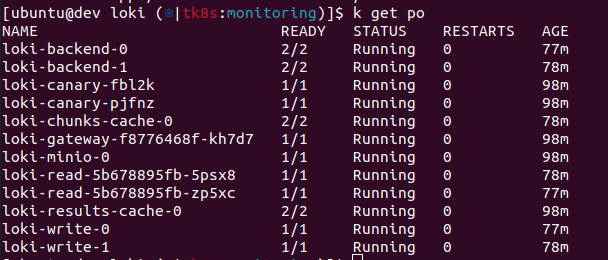
이제 loki엔드포인트가 생성되었으니 promtail로 돌아가 배포해보도록 한다.
참고로 Minio에 로그인을해서 Access Key를 생성하고 Loki연결부분을 교체해서 helm 재배포를 해야한다.
ingress
위 템플릿으로 배포하면 ingress가 빠져있다.
helm에 구성해도되고 직접 구성해도된다.
apiVersion: networking.k8s.io/v1
kind: Ingress
metadata:
  name: loki-minio-console
  namespace: monitoring
spec:
  ingressClassName: nginx
  rules:
    - host: minio-loki.tk8s.test       # 원하는 도메인 이름으로 교체
      http:
        paths:
          - path: /
            pathType: Prefix
            backend:
              service:
                name: loki-minio-console
                port:
                  number: 9001
  tls:
  - hosts:
    - minio-loki.tk8s.test
    secretName: ssl-certs
---
apiVersion: networking.k8s.io/v1
kind: Ingress
metadata:
  name: loki-ingress
  namespace: monitoring
spec:
  ingressClassName: nginx
  rules:
    - host: loki.tk8s.test
      http:
        paths:
          - path: /
            pathType: Prefix
            backend:
              service:
                name: loki-gateway
                port:
                  number: 80
  tls:
  - hosts:
    - loki.tk8s.test
    secretName: ssl-certs
Loki 삭제
helm list -n monitoring
helm uninstall loki -n monitoring
pvc
kubectl delete pvc -n monitoring -l app.kubernetes.io/name=lokipv
kubectl get pv | grep monitoring | awk '{print $1}' | xargs kubectl delete pvMinIO
배포를 하면 기본은 MinIO의 ingress정보가 없다. 생성해서 붙여주면된다.
Grafana
| 설정 항목 | 값 | 설명 |
|---|---|---|
| Name | Loki | 원하는 이름 |
| URL | https://loki.tk8s.test | Loki Ingress 주소 |
| Access | Server (Default) | Grafana 서버에서 Loki로 직접 요청 |
| Custom HTTP Headers | X-Scope-OrgID: default | (multi-tenancy 활성화된 Loki에서 필수) |
| Skip TLS Verify | ✅ (선택) | 자체 서명 인증서인 경우 반드시 켜기 |
| Version | 자동 인식 | Loki 3.5.x 확인 가능 |
Loki배포할때 auth_enabled기본값이 true로 되어있으므로 Headers에 넣어주도록 한다.
promtail configmap과 맞춰줄것.
Tempo
Grafana Tempo는 오픈소스로 제공되며 사용하기 쉽고 확장성이 뛰어난 분산 추적 백엔드입니다. Tempo를 사용하면 추적을 검색하고, 스팬에서 메트릭을 생성하고, 추적 데이터를 로그 및 메트릭과 연결할 수 있습니다.
https://grafana.com/docs/tempo/latest
Architecture

Deploy Tempo on Kubernetes
https://grafana.com/docs/tempo/latest/set-up-for-tracing/setup-tempo/deploy/kubernetes
권장 스펙
상당히 높다…

kubectl create ns tempohelm pull grafana/tempo-distributed --untarotlp gRPC수집위하여 enabled: true로 변경한다.


ingester PV 설정정보 추가

metricsGenerator 활성

Mimir
Grafana Mimir는 Prometheus 및 OpenTelemetry 메트릭에 대한 장기 저장소를 제공하는 오픈소스 소프트웨어 프로젝트입니다. Grafana Mimir를 사용하면 대규모 메트릭 데이터를 저장하고 쿼리할 수 있는 강력한 솔루션을 제공하여 Prometheus의 기능을 확장할 수 있습니다.
아래 와 같은 흐름으포 프로젝트가 확장되었다고 한다.Thanos도 간단하게 배포 테스트는 해보았는데, 프로젝트 수준이 federation으로 해도 될 수준이라 Thanos는 안했는데 Mimir를 해보게 되었다…
Prometheus → Thanos → Cortex → Mimir데이터 보관 과정
[ Prometheus ] → [ Distributor ] → [ Ingester ] → [ Compactor ] → [ Object Storage (S3, MinIO) ]배포 모드
도구와 배포 방법을 고를때는 어떤 환경과 누가 운영하는지 고려하고 어떤 방식으로 배포할지를 고려하는 습관을 들이자..
https://grafana.com/docs/mimir/latest/references/architecture/deployment-modes
- 모놀리식 모드: 간단한 배포를 위해 모든 구성 요소를 단일 프로세스에서 실행합니다.
- 마이크로서비스 모드: 최대의 확장성과 유연성을 위해 구성 요소를 별도로 배포합니다.


Because monolithic mode requires scaling all Grafana Mimir components together, this deployment mode isn’t recommended for large-scale deployments.
확장가능한 모놀로식 모드는 대규모 배포환경에는 맞지 않다는 문구가 있다.
이 문구는 각 배포되는 구성 요소들을 세밀하게 컨트롤 할수 있다는 의미…

monolithic(All in one) 방식과 microservice방식 중 선택을 해야한다.
내가 직접 서비스를 운영한다면 microservice를 채택하겠지만 배포후 운영을 누가할지 모른다면… Scale monolithic mode 방식을 채택할 것 같기는 하다.
Mimir Distributed mode
우선은 Setup 메뉴에있는 방식중 하나로 Helm으로 배포해본다.
https://grafana.com/docs/mimir/latest/set-up/helm-chart
https://grafana.com/docs/helm-charts/mimir-distributed/latest/get-started-helm-charts
kubectl create namespace mimir
# repo등록은 위에서 진행했으므로 생략
# helm repo add grafana https://grafana.github.io/helm-charts
# helm repo update grafana
helm search repo grafana
grafana/mimir-distributed 차트를 사용하도록 한다.
helm pull grafana/mimir-distributed --untar
small.yaml을 이용해서 배포할 것이다.
minio만 활성해서 배포 하는데, 차트에있는 기본 형태로 배포하면 경고 나타나고 이상하게 배포된다. memory 부분 수치때문에 발생하는 것이다.
alertmanager:
  persistentVolume:
    enabled: true
  replicas: 2
  resources:
    limits:
      memory: 1.4Gi
    requests:
      cpu: 1
      memory: 1Gi
  statefulSet:
    enabled: true

compactor:
  persistentVolume:
    size: 20Gi
  resources:
    limits:
      memory: 2.1Gi
    requests:
      cpu: 1
      memory: 1.5Gi

distributor:
  replicas: 2
  resources:
    limits:
      memory: 5.7Gi
    requests:
      cpu: 2
      memory: 4Gi

ingester:
  persistentVolume:
    size: 50Gi
  replicas: 3
  resources:
    limits:
      memory: 12Gi
    requests:
      cpu: 3.5
      memory: 8Gi
  topologySpreadConstraints: {}
  affinity:
    podAntiAffinity:
      requiredDuringSchedulingIgnoredDuringExecution:
        - labelSelector:
            matchExpressions:
              - key: app.kubernetes.io/component
                operator: In
                values:
                  - ingester
          topologyKey: "kubernetes.io/hostname"

  zoneAwareReplication:
    topologyKey: "kubernetes.io/hostname"

admin-cache:
  enabled: true
  replicas: 3

chunks-cache:
  enabled: true
  replicas: 3

index-cache:
  enabled: true
  replicas: 3

metadata-cache:
  enabled: true
  replicas: 3

results-cache:
  enabled: true
  replicas: 3

minio:
  enabled: true
  mode: standalone
  rootUser: grafana-mimir
  buckets:
    - name: mimir-tsdb
      policy: none
      purge: false
    - name: mimir-ruler
      policy: none
      purge: false
  persistence:
    size: 5Gi
  resources:
    requests:
      cpu: 100m
      memory: 128Mi
  rootPassword: supersecret
  # Changed the mc config path to '/tmp' from '/etc' as '/etc' is only writable by root and OpenShift will not permit this.
  configPathmc: "/tmp/minio/mc/"

overrides_exporter:
  replicas: 1
  resources:
    limits:
      memory: 128Mi
    requests:
      cpu: 100m
      memory: 128Mi

querier:
  replicas: 1
  resources:
    limits:
      memory: 5.6Gi
    requests:
      cpu: 2
      memory: 4Gi

query_frontend:
  replicas: 1
  resources:
    limits:
      memory: 2.8Gi
    requests:
      cpu: 2
      memory: 2Gi

ruler:
  replicas: 1
  resources:
    limits:
      memory: 2.8Gi
    requests:
      cpu: 1
      memory: 2Gi

store_gateway:
  persistentVolume:
    size: 10Gi
  replicas: 3
  resources:
    limits:
      memory: 2.1Gi
    requests:
      cpu: 1
      memory: 1.5Gi
  topologySpreadConstraints: {}
  affinity:
    podAntiAffinity:
      requiredDuringSchedulingIgnoredDuringExecution:
        - labelSelector:
            matchExpressions:
              - key: app.kubernetes.io/component
                operator: In
                values:
                  - store-gateway
          topologyKey: "kubernetes.io/hostname"
  zoneAwareReplication:
    topologyKey: "kubernetes.io/hostname"

gateway:
  replicas: 1
  resources:
    limits:
      memory: 731Mi
    requests:
      cpu: 1
      memory: 512Mi
내가 배포한 형식은 아래와 같다.
내 테스트 클러스터의 자원이 넉넉하지 않아서 축소해서 배포하였다.
# ---------------------------------------------------------------------------
# Grafana Mimir distributed - lightweight deployment (for small clusters)
# ---------------------------------------------------------------------------

alertmanager:
  persistentVolume:
    enabled: true
  replicas: 1
  resources:
    requests:
      cpu: 100m
      memory: 256Mi
    limits:
      cpu: 200m
      memory: 512Mi
  statefulSet:
    enabled: true

compactor:
  persistentVolume:
    size: 20Gi
  resources:
    requests:
      cpu: 200m
      memory: 512Mi
    limits:
      cpu: 300m
      memory: 1Gi

distributor:
  replicas: 2
  resources:
    requests:
      cpu: 200m
      memory: 512Mi
    limits:
      cpu: 300m
      memory: 1Gi

ingester:
  persistentVolume:
    size: 50Gi
  replicas: 3
  resources:
    requests:
      cpu: 300m
      memory: 1Gi
    limits:
      cpu: 500m
      memory: 2Gi
  topologySpreadConstraints: {}
  affinity:
    podAntiAffinity:
      requiredDuringSchedulingIgnoredDuringExecution:
        - labelSelector:
            matchExpressions:
              - key: app.kubernetes.io/component
                operator: In
                values:
                  - ingester
          topologyKey: "kubernetes.io/hostname"

  zoneAwareReplication:
    topologyKey: "kubernetes.io/hostname"

querier:
  replicas: 1
  resources:
    requests:
      cpu: 200m
      memory: 512Mi
    limits:
      cpu: 400m
      memory: 1Gi

query_frontend:
  replicas: 1
  resources:
    requests:
      cpu: 100m
      memory: 256Mi
    limits:
      cpu: 200m
      memory: 512Mi

ruler:
  replicas: 1
  resources:
    requests:
      cpu: 200m
      memory: 512Mi
    limits:
      cpu: 300m
      memory: 1Gi

store_gateway:
  persistentVolume:
    size: 10Gi
  replicas: 3
  resources:
    requests:
      cpu: 200m
      memory: 512Mi
    limits:
      cpu: 400m
      memory: 1Gi
  topologySpreadConstraints: {}
  affinity:
    podAntiAffinity:
      requiredDuringSchedulingIgnoredDuringExecution:
        - labelSelector:
            matchExpressions:
              - key: app.kubernetes.io/component
                operator: In
                values:
                  - store-gateway
          topologyKey: "kubernetes.io/hostname"
  zoneAwareReplication:
    topologyKey: "kubernetes.io/hostname"

gateway:
  replicas: 1
  resources:
    limits:
      memory: 1024Mi
    requests:
      cpu: 1
      memory: 512Mi

# ---------------------------------------------------------------------------
# Cache components (memcached + exporter)
# ---------------------------------------------------------------------------

admin-cache:
  enabled: true
  replicas: 2
  resources:
    requests:
      cpu: "50m"
      memory: "128Mi"
    limits:
      cpu: "200m"
      memory: "256Mi"
  exporter:
    resources:
      requests:
        cpu: "20m"
        memory: "64Mi"
      limits:
        cpu: "100m"
        memory: "128Mi"

chunks-cache:
  enabled: true
  replicas: 2
  resources:
    requests:
      cpu: "50m"
      memory: "128Mi"
    limits:
      cpu: "200m"
      memory: "256Mi"
  exporter:
    resources:
      requests:
        cpu: "20m"
        memory: "64Mi"
      limits:
        cpu: "100m"
        memory: "128Mi"

index-cache:
  enabled: true
  replicas: 2
  resources:
    requests:
      cpu: "50m"
      memory: "128Mi"
    limits:
      cpu: "200m"
      memory: "256Mi"
  exporter:
    resources:
      requests:
        cpu: "20m"
        memory: "64Mi"
      limits:
        cpu: "100m"
        memory: "128Mi"

metadata-cache:
  enabled: true
  replicas: 2
  resources:
    requests:
      cpu: "50m"
      memory: "128Mi"
    limits:
      cpu: "200m"
      memory: "256Mi"
  exporter:
    resources:
      requests:
        cpu: "20m"
        memory: "64Mi"
      limits:
        cpu: "100m"
        memory: "128Mi"

results-cache:
  enabled: true
  replicas: 2
  resources:
    requests:
      cpu: "50m"
      memory: "128Mi"
    limits:
      cpu: "200m"
      memory: "256Mi"
  exporter:
    resources:
      requests:
        cpu: "20m"
        memory: "64Mi"
      limits:
        cpu: "100m"
        memory: "128Mi"

# ---------------------------------------------------------------------------
# Supporting components
# ---------------------------------------------------------------------------
overrides_exporter:
  replicas: 1
  resources:
    limits:
      memory: 128Mi
    requests:
      cpu: 100m
      memory: 128Mi

# ---------------------------------------------------------------------------
# Object storage (embedded MinIO for demo/test)
# ---------------------------------------------------------------------------
# id: grafana-mimir
# pw: supersecret
minio:
  enabled: true
  mode: standalone
  rootUser: grafana-mimir
  buckets:
    - name: mimir-tsdb
      policy: none
      purge: false
    - name: mimir-ruler
      policy: none
      purge: false
  persistence:
    size: 5Gi
  resources:
    requests:
      cpu: 100m
      memory: 128Mi
  rootPassword: supersecret
  # Changed the mc config path to '/tmp' from '/etc' as '/etc' is only writable by root and OpenShift will not permit this.
  configPathmc: "/tmp/minio/mc/"


# -- Enable Kafka for ingest-storage architecture
kafka:
  enabled: true
# helm -n mimir-test install mimir grafana/mimir-distributed
helm install mimir grafana/mimir-distributed -n mimir -f small-minio.yamlhelm upgrade mimir grafana/mimir-distributed -n mimir -f small-minio.yaml
mimir external access 설정정보
minio접속을 해보려면 ingress를 하나 추가하면된다.
apiVersion: networking.k8s.io/v1
kind: Ingress
metadata:
  name: mimir-minio-console
  namespace: mimir
spec:
  ingressClassName: nginx
  rules:
    - host: minio-mimir.tk8s.test       # 원하는 도메인 이름으로 교체
      http:
        paths:
          - path: /
            pathType: Prefix
            backend:
              service:
                name: mimir-minio-console
                port:
                  number: 9001
  tls:
  - hosts:
    - minio-mimir.tk8s.test       # 원하는 도메인 이름으로 교체
    secretName: ssl-certs
---
apiVersion: networking.k8s.io/v1
kind: Ingress
metadata:
  name: mimir-ingress
  namespace: mimir
spec:
  ingressClassName: nginx
  rules:
    - host: mimir.tk8s.test       # 원하는 도메인 이름으로 교체
      http:
        paths:
          - path: /
            pathType: Prefix
            backend:
              service:
                # name: mimir-distributor
                name: mimir-gateway
                port:
                  # number: 8080
                  number: 80
  tls:
  - hosts:
    - mimir.tk8s.test       # 원하는 도메인 이름으로 교체
    secretName: ssl-certs
Prometheus Remote Write
Mimir로 prometheus에서 수집한 metric을 전송하기위한 설정을 해야한다.
Prometheus는 이미 배포된 상태라 가정하고 진행한다.
Prometheus config에 remote_write를 설정하였다.
headers가 비어있으면 안됨 꼭 넣을것. 받는쪽에서 multitenant가 활성되어서 설정해주어야한다.
remote_write:
  - url: https://mimir.tk8s.test/api/v1/push
    remote_timeout: 30s
    tls_config:
      insecure_skip_verify: true
    headers:
      X-Scope-OrgID: "hk8s"
    queue_config:
      capacity: 5000
      max_shards: 100
      max_samples_per_send: 1000
      batch_send_deadline: 5s
    write_relabel_configs:
      - source_labels: [__name__]
        regex: ".*"
        action: keep
라벨 이슈가 발생하였다. 기본값이 30개로 제한되어있는데 hk8s클러스터에서 34개를 발생시키고 있어서 문제가생김.
time=2025-11-10T09:52:45.305Z level=ERROR source=queue_manager.go:1670 msg="non-recoverable error" component=remote remote_name=5b8a51 url=https://mimir.tk8s.test/api/v1/push failedSampleCount=1000 failedHistogramCount=0 failedExemplarCount=0 err="server returned HTTP status 400 Bad Request: received a series whose number of labels exceeds the limit (actual: 34, limit: 30) series: 'istio_requests_total{app=\"butler\", connection_security_policy=\"mutual_tls\", destination_app=\"butler\", destination_canonical_revision=\"latest\", destination_canonical_service=\"butler\", destination_clust…' (err-mimir-max-label-names-per-series). To adjust the related per-tenant limit, configure -validation.max-label-names-per-series, or contact your service administrator.\n늘려주면된다.
# small-minio.yaml
# ---------------------------------------------------------------------------
# Mimir config overrides (추가 부분)
# ---------------------------------------------------------------------------
mimir:
  structuredConfig:
    multitenancy_enabled: true     # 여러 tenant 지원 (Prometheus에서 X-Scope-OrgID 헤더 전송 시 필요)
    limits:
      max_label_names_per_series: 40   # 기존 30 → 40으로 확장
[이슈] Prometheus ingestion errors
https://grafana.com/docs/grafana-cloud/send-data/metrics/metrics-prometheus/ingestion-errors
ts=2025-11-11T05:24:25.684886843Z
caller=pusher.go:561
component=ingest_reader
user=hk8s
level=warn
msg="detected a client error while ingesting write request (the request may have been partially ingested)"
err="user=hk8s: per-user series limit of 150000 exceeded (err-mimir-max-series-per-user). To adjust the related per-tenant limit, configure -ingester.max-global-series-per-user, or contact your service administrator. (sampled 1/10)"
grafana에는 prometheus 타입으로 데이터 소스를 추가한다.
multitenant이므로 X-Scope-OrgID 는 각각 다르게하여 datasource를 등록해야한다.

S3 or Minio
https://grafana.com/docs/mimir/latest/configure/configure-object-storage-backend