
Ansible은 서버 자동화, 구성 관리, 애플리케이션 배포 등을 위해 사용되는 도구입니다.
특히, 에이전트가 필요하지 않고 YAML을 기반으로 직관적인 구성을 제공하여 초보자부터 전문가까지 쉽게 접근할 수 있습니다.

이번 포스트에서는 Ubuntu 22.04 서버에서 Ansible을 설치하고 사용하는 방법을 소개하겠습니다.
Ansible이란?
Ansible은 IT 자동화를 위해 개발된 오픈 소스 도구입니다. SSH를 통해 서버에 접근하여 작업을 수행하며, 멀티 노드 환경에서도 쉽게 확장이 가능합니다. 이 포스트에서는 Ansible을 사용해 서버 관리를 자동화하는 기본적인 방법을 다루겠습니다.
QuickStart
Ansible 설치
Ubuntu 22.04 서버에 Ansible을 설치하려면 먼저 시스템 패키지를 업데이트하고, Ansible을 설치해야 합니다.
sudo apt update && sudo apt install ansible -y버전 확인
ansible --version
Alias 설정
bash용 alias를 설정합니다.
vim ~/.bashrc# 맨아래 줄에 추가합니다.
alias ans='ansible'
alias ansplay='ansible-playbook'Ansible 인벤토리 구성
Ansible에서 관리할 서버 목록을 정의하는 인벤토리 파일을 설정해야 합니다.
hosts: 전통적으로 사용되던 용어로, 일반적으로 /etc/ansible/hosts 파일을 가리킵니다.
inventory: 현재 Ansible 문서에서 사용하는 용어로, 호스트 및 그룹 목록을 정의하는 모든 파일이나 시스템을 지칭합니다.
ubuntu에서 패키지로 설치하면 /etc/ansible폴더가 존재하지 않으므로 폴더를 생성해줘야합니다.
폴더를 생성하고 환경설정을위하여 ansible.cfg 파일과 inventory.ini파일을 생성합니다.
mkdir /etc/ansible
cd /etc/ansible
touch ansible.cfg
touch inventory.ini
ansible cfg는 기본 환경 설정 파일로 사용됩니다.
[defaults]
inventory = ./inventory.ini
remote_user = ubuntu
host_key_checking = False
interpreter_python = /usr/bin/python3
inventory.ini파일에는 원격으로 관리할 호스트 정보를 입력합니다.
그러나 key파일이 없으므로 생성해야 합니다.
[k8s-master]
tk8s-master01 ansible_host=192.168.0.215 ansible_ssh_private_key_file=~/.ssh/ans.key
SSH 키 기반 인증 설정
Ansible은 원격 호스트와 통신하기위하여 비밀번호 또는 ssh키가 필요합니다.
비밀번호보다 ssh방식을 더 권장하고 있습니다.
ssh-keygen -t rsa -b 4096
public키 파일을 보기좋게 이름을 변경합니다.
mv /root/.ssh/ans.key.pub ans.pubans.pub키는 원격서버에 설정이 필요합니다.
원격서버의 /home/ubuntu/.ssh/authorized_keys에 입력합니다.
원격 서버 추가 설정
ansible동작시 원격서버에서 권한 상승이 발생할때 비밀번호 입력 이벤트가 발생할 수 있습니다.
ubuntu권한으로 실행시에 아래 방법으로 비밀번호를 묻지 않도록 설정 할 수 있습니다.
#!/bin/bash

set -e -x

echo "ubuntu nopasswd"

cat > /etc/sudoers.d/99-ubuntu-nopasswd <<EOF
# User rules for ubuntu
ubuntu ALL=(ALL) NOPASSWD:ALL
EOF

echo "chmod 440 /etc/sudoers.d/99-ubuntu-nopasswd"
chmod 440 /etc/sudoers.d/99-ubuntu-nopasswd
Ansible 기본 사용법
이 단계부터는 간단한 명령을 사용하여 원격 서버를 제어합니다.
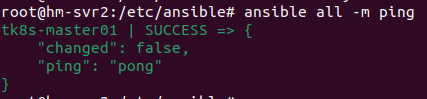
제일 많이 해보는 ping 테스트를 해봅니다.
# /etc/ansible
ansible all -m ping
결과로 각 서버에서 pong 응답이 돌아오면 연결이 정상적이라는 의미입니다.
Ansible-playbook을 이용하여 코드로 인프라 설정 관리
Ansible-playbook은 여러 명령을 YAML 파일로 정의하여 자동화할 수 있는 기능입니다.
좀 복잡하긴하지만 쿠버네티스 마스터를 구성해보겠습니다.
playbook 작성
아래 코드내용으로 k8s-single-master.yaml 파일을 만들고 실행합니다.
# k8s-single-master.yaml
---
- name: k8s install single master
  hosts: kubernetesMaster
  remote_user: ubuntu
  gather_facts: yes
  become: yes
  become_user: root
  tasks:
    # Set Host Name
    - name: Change hostname
      ansible.builtin.hostname:
        name: "{{ inventory_hostname }}"

    # Timezone 설정
    - name: Set timezone to Asia/Seoul
      ansible.builtin.command:
        cmd: timedatectl set-timezone Asia/Seoul
      register: timezone_result

    - name: Update apt cache after setting compression
      apt:
        update_cache: yes
      tags: update

    # Swap Memory 비활성화
    - name: Disable swap memory
      ansible.builtin.command:
        cmd: swapoff -a

    - name: Remove swap entry from fstab
      ansible.builtin.lineinfile:
        path: /etc/fstab
        regexp: '^.*swap.*'
        line: '# swap'
        state: present

    # containerd 설치
    - name: Install containerd
      ansible.builtin.apt:
        name: containerd
        state: present

    # containerd 설정 파일 생성 및 수정
    - name: Create containerd config directory
      ansible.builtin.file:
        path: /etc/containerd
        state: directory

    - name: Generate containerd default config
      ansible.builtin.command:
        cmd: "containerd config default"
      register: containerd_config

    - name: Write containerd config to file
      ansible.builtin.copy:
        content: "{{ containerd_config.stdout }}"
        dest: /etc/containerd/config.toml

    - name: Update SystemdCgroup in containerd config
      ansible.builtin.replace:
        path: /etc/containerd/config.toml
        regexp: 'SystemdCgroup = false'
        replace: 'SystemdCgroup = true'

    # 커널 모듈 로드 및 네트워크 설정
    - name: Load kernel modules for Kubernetes
      ansible.builtin.copy:
        dest: /etc/modules-load.d/k8s.conf
        content: |
          overlay
          br_netfilter

    - name: Load overlay module
      ansible.builtin.modprobe:
        name: overlay

    - name: Load br_netfilter module
      ansible.builtin.modprobe:
        name: br_netfilter

    - name: Set sysctl parameters for Kubernetes
      ansible.builtin.copy:
        dest: /etc/sysctl.d/k8s.conf
        content: |
          net.bridge.bridge-nf-call-iptables  = 1
          net.bridge.bridge-nf-call-ip6tables = 1
          net.ipv4.ip_forward                 = 1

    - name: Apply sysctl parameters without reboot
      ansible.builtin.command:
        cmd: sysctl --system

    # 시스템 재부팅
    - name: Reboot the system and wait for it to come back
      ansible.builtin.reboot:
        reboot_timeout: 300
        msg: "Rebooting the system to apply changes"

    - name: Wait for system to be up after reboot
      ansible.builtin.wait_for_connection:
        timeout: 300
    - name: Install apt-transport-https, ca-certificates, and curl
      ansible.builtin.apt:
        name:
          - apt-transport-https
          - ca-certificates
          - curl
        state: present
        update_cache: yes

    # Kubernetes GPG 키 다운로드 및 저장
    - name: Download Kubernetes apt keyring
      ansible.builtin.get_url:
        url: https://pkgs.k8s.io/core:/stable:/v1.30/deb/Release.key
        dest: /tmp/Release.key

    - name: Add Kubernetes apt keyring
      ansible.builtin.command:
        cmd: gpg --dearmor -o /etc/apt/keyrings/kubernetes-apt-keyring.gpg /tmp/Release.key

    # Kubernetes apt 저장소 추가
    - name: Add Kubernetes apt repository
      ansible.builtin.apt_repository:
        repo: "deb [signed-by=/etc/apt/keyrings/kubernetes-apt-keyring.gpg] https://pkgs.k8s.io/core:/stable:/v1.30/deb/ /"
        state: present

    # apt 캐시 업데이트
    - name: Update apt cache
      ansible.builtin.apt:
        update_cache: yes

    # kubeadm, kubelet, kubectl 특정 버전 설치
    - name: Install specific version of kubeadm, kubelet, and kubectl
      ansible.builtin.apt:
        name:
          - kubeadm=1.30.5-1.1
          - kubelet=1.30.5-1.1
          - kubectl=1.30.5-1.1
        state: present

    # 패키지 버전 고정
    - name: Hold kubeadm, kubelet, and kubectl packages
      ansible.builtin.command:
        cmd: "apt-mark hold kubelet kubeadm kubectl"

    # Kubernetes 마스터 노드 초기화
    - name: Initialize Kubernetes master node
      ansible.builtin.command:
        cmd: kubeadm init --apiserver-advertise-address "{{ ansible_default_ipv4.address }}" --pod-network-cidr=10.1.0.0/16
      register: kubeadm_init_output

    - name: Display kubeadm init output
      ansible.builtin.debug:
        msg: "{{ kubeadm_init_output.stdout }}"

    # kubectl 설정 파일 복사
    - name: Create .kube directory for the ubuntu user
      ansible.builtin.file:
        path: /home/ubuntu/.kube
        state: directory
        owner: ubuntu
        group: ubuntu
        mode: '0755'
      become: yes
      become_user: ubuntu
      tags: kubeadm-post

    - name: Copy admin.conf to .kube/config for the ubuntu user
      ansible.builtin.copy:
        src: /etc/kubernetes/admin.conf
        dest: /home/ubuntu/.kube/config
        owner: ubuntu
        group: ubuntu
        mode: '0644'
        remote_src: yes
      become: yes
      tags: kubeadm-post

    - name: Ensure proper ownership of .kube/config for the ubuntu user
      ansible.builtin.file:
        path: /home/ubuntu/.kube/config
        owner: ubuntu
        group: ubuntu
        mode: '0644'
      become: yes
      tags: kubeadm-post
yaml을 작성했으면 실행합니다.
ansible-playbook k8s-single-master.yaml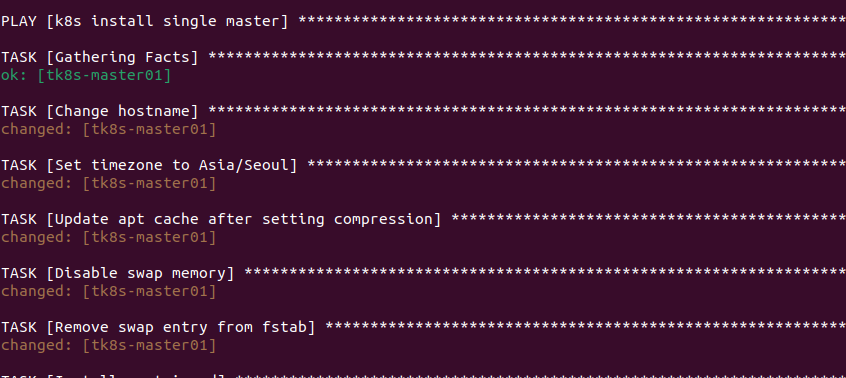
이제 Ubuntu 22.04 서버 환경에서 Ansible을 사용하는 기본적인 방법을 익혔습니다. Ansible을 활용하면 서버 구성 작업을 자동화하고, 수많은 서버를 효율적으로 관리할 수 있습니다. Playbook을 작성하여 복잡한 작업도 쉽게 자동화할 수 있으며, 이를 통해 개발과 운영 작업을 간소화할 수 있습니다.
group_vars
변수처리를 위해사용하는 예약된 디렉토리.
hosts.ini와 ㄱ같은 위치에 놓을것.
your-ansible-project/
├── hosts.ini
├── group_vars/
│   ├── all.yml             ← 모든 노드에 적용
│   ├── master.yml          ← [master] 그룹에만 적용
│   └── worker.yml          ← [worker] 그룹에만 적용
├── playbooks/
│   └── 00_prepare_cluster.yml